
Choosing the right campervan battery monitor is essential for campervan owners and DIY van builders who want to ensure reliable power management on the road. This guide is specifically designed for those converting their own vans, upgrading an existing setup, or simply seeking to better understand their campervan’s electrical system. Here, you’ll learn how to choose, install, and use a battery monitor tailored for campervans, so you can avoid unexpected power loss, protect your batteries from damage, and enjoy peace of mind during your off-grid adventures. Battery monitoring matters for campervan users because it helps prevent deep discharges, extends battery life, and ensures you always have the power you need for your journey.
A campervan battery monitor is an essential device for anyone relying on a leisure battery system. This article will help you select and install the right campervan battery monitor for your needs, ensuring you have the information and control required for safe, efficient, and enjoyable travel.
A campervan battery monitor provides real-time data about a leisure battery's health and capacity. It measures the state of charge, tracks ampere-hours consumed, and helps track state of charge accurately by providing real-time data on battery voltage and current. With the right battery monitor, you can prevent deep discharges, extend battery life, and confidently manage your campervan’s electrical system.
What is a Campervan Battery Monitor?
A campervan battery monitor provides real-time data about a leisure battery's health and capacity. It measures the state of charge, tracks ampere-hours consumed, and helps track state of charge accurately by providing real-time data on battery voltage and current. This allows you to monitor your battery’s performance, avoid over-discharging, and plan your energy usage more effectively.
Why Do You Need a Campervan Battery Monitor?
A campervan battery monitor provides real-time data about a leisure battery's health and capacity. Battery monitors measure the state of charge of batteries, help track state of charge accurately, and provide real-time data on battery voltage and current. Without a monitor, estimating battery charge based on voltage is highly inaccurate, especially for lithium batteries. This makes a battery monitor essential for anyone who wants to avoid power loss, protect their batteries, and ensure their campervan electrical system runs smoothly.
Battery Management Basics
Managing your battery's health avoids over-discharge and maximises its lifespan. This is especially important for lead acid batteries, which degrade quickly if discharged too deeply, and a monitor can also be configured for lithium batteries. Monitoring lets you keep charge levels within safe limits, extending your battery's usable life.
Good management also helps you avoid wasted power and surprises. Tracking usage in amp hours lets you better plan your power needs, see how much energy you have used, and know what remains before you need to recharge, which is essential when following a DIY campervan electrical system checklist. Your batteries will last longer, and you always know what to expect.
Benefits of Monitoring Campervan Batteries
Monitoring tools show real-time power use from a 12V battery, giving you easy monitoring of energy consumption so you can optimise usage, conserve power, and prioritise critical devices when energy is low.
A good monitoring setup should include all the essential features for alerts and protection. If your battery levels drop too low or exceed safe limits, you'll know immediately, preventing potential damage and downtime. Accurate insights and early warnings ensure your battery performs better and lasts longer.
Common Battery Voltage Monitoring Challenges
It's easy to miscalculate power needs without monitoring, leading to dead batteries and system failures. Over-using or undercharging are common mistakes that shorten battery life and disrupt power flow.
Inaccurate usage estimates can also leave you guessing about the remaining charge, especially with multiple devices running. A simple voltage reading can give a false impression of battery state because voltage changes during charging and use, so monitoring avoids these pitfalls by providing precise, real-time data on charge levels and power draw, keeping your power system efficient and reliable.
It can also take several hours for voltage to settle before it reflects the true battery state.
What is a Victron Energy SmartShunt?
The SmartShunt is a Victron Energy smart shunt unit: a simplified, all-in-one battery monitor. It tracks critical battery data without a display, relying on your smartphone for a streamlined interface. Through the VictronConnect app, the SmartShunt shows your battery's state of charge, time remaining, remaining capacity, current flow, and historical data like discharge cycles and average consumption. It can also connect to GX devices like the Cerbo GX for expanded system monitoring.
Core Features:
- Measurement accuracy: Tracks battery voltage, current, and state of charge.
- Bluetooth connectivity: Built-in Bluetooth connects you to the VictronConnect app.
- Real-time metrics: Get real-time data on voltage, amperage, temperature, and battery status.
How does the Victron SmartShunt work?
The SmartShunt uses a shunt) to measure current draw. This small device sits between the battery and the rest of the system, measuring current flow into and out of the battery bank. It calculates the remaining battery life, effectively serving as a "fuel gauge" for your power needs.
The VictronConnect app lets you view battery stats directly on your smartphone, with the most accurate readings after it has synced from a fully charged battery baseline so it knows when the system is fully charged. This app provides:
- A dashboard of real-time data.
- Showing state of charge.
- Remaining time.
- Usage trends.
This integration lets you track battery health without extra wiring or displays.
How to install the Victron SmartShunt
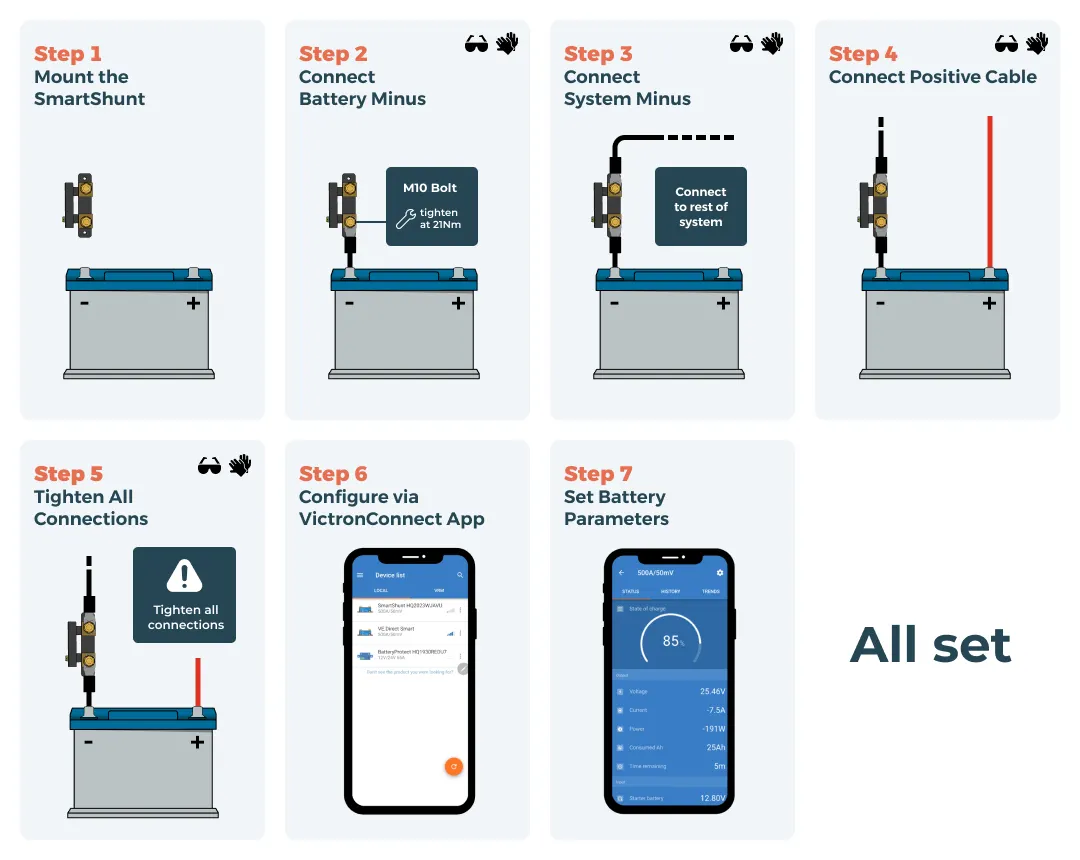
- Mount the SmartShunt: Mount the SmartShunt on a fire-resistant board.
- Connect battery minus: Attach the negative battery terminal to the "Battery Minus" terminal on the SmartShunt using an M10 bolt at the battery terminals. Make sure there are no other connections here to ensure accurate monitoring.
- System minus connection: Attach the system's negative connection (all DC loads, inverters, and chargers) to the "System Minus" terminal on the SmartShunt.
- Connect power: Connect the positive (red) cable from the battery's positive terminal to the Vbatt+ input on the SmartShunt, which powers the device.
- Tighten Connections: Tighten all connections.
- Configure the app: Download the VictronConnect app onto your phone.
- Set Battery Connections: Set the SmartShunt to work with your specific battery type and match the battery charger profile where relevant.
Wiring considerations:
- Tighten bolts to the recommended torque (21Nm) to ensure secure connections.
- Avoid placing other connections on the battery minus terminal, as this will disrupt accurate state-of-charge readings.
Configuration tips:
- Once installed, open the VictronConnect app to set up the SmartShunt:
- Pairing: Enable Bluetooth on your device, select the SmartShunt in the app, and follow on-screen instructions to connect.
- Setting battery parameters: Enter battery capacity and charge thresholds to ensure accurate monitoring. The SmartShunt can assess battery condition more accurately once these parameters are set correctly.
- Configure alerts and notifications for low states of charge or voltage so you receive real-time warnings when levels are low.
This Victron SmartShunt setup provides comprehensive battery insights, allowing you to control energy usage and help prevent unexpected power loss, and if you’re unsure about configuration you can always get support through our campervan electrical design consultation.
What is the Victron Cerbo GX?
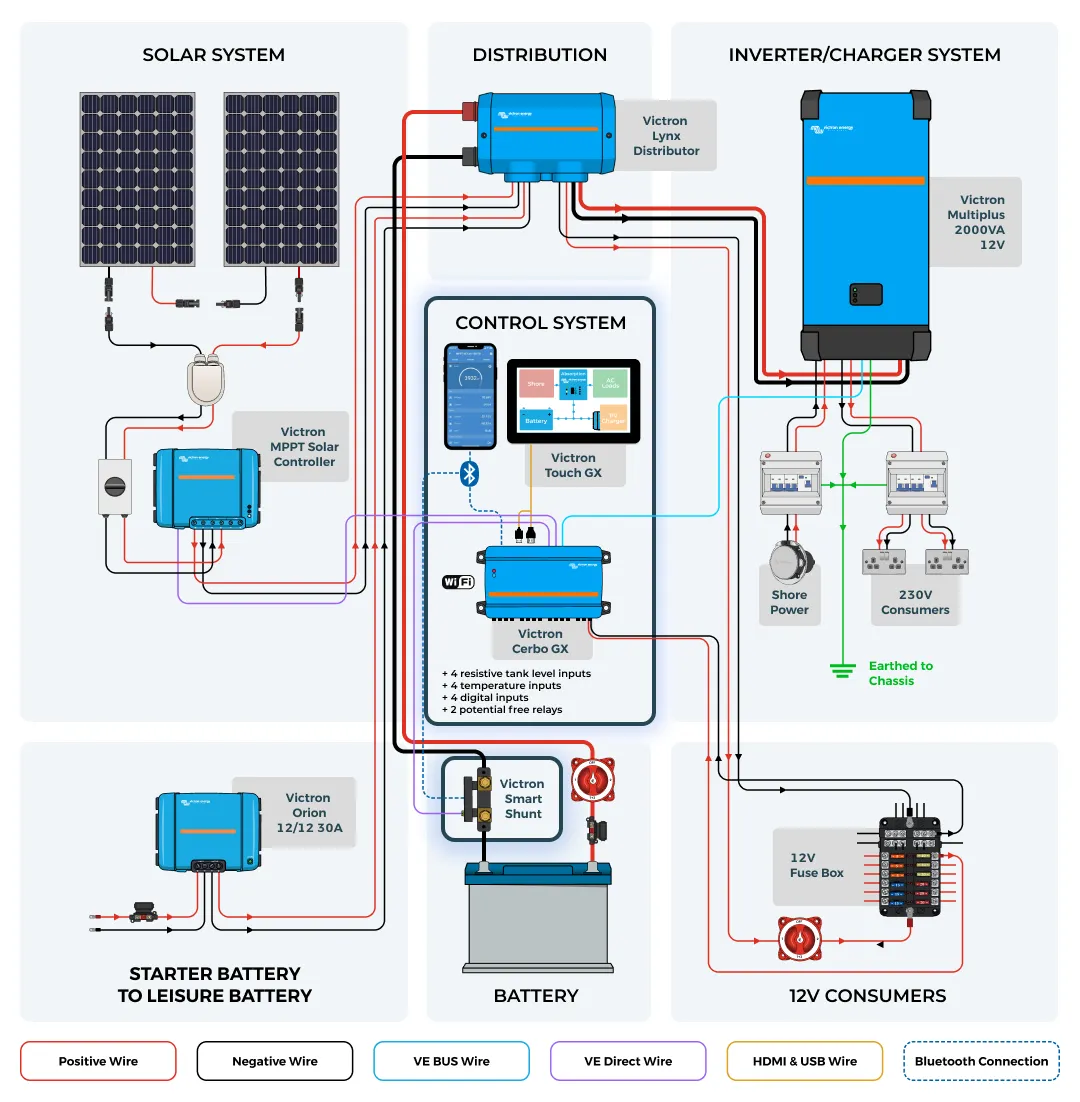
The Victron Cerbo GX is a central hub and fixed control panel for managing multiple Victron devices in a campervan electrical setup. In a camper van, it acts as the system's communication centre, linking devices like the SmartShunt, solar controllers, and inverters for enhanced monitoring and control.
Core features:
- Real-time data access: The Cerbo GX provides instant access to energy data, showing real-time voltage, current, and battery status.
- Device integration: Connects seamlessly with other Victron products, such as SmartShunt and solar controllers, to gather and centralise data, including an auxiliary battery where fitted.
- Support for multiple inputs: The device supports several battery and auxiliary inputs, including options for an engine battery plus temperature and tank sensors, offering comprehensive monitoring beyond just batteries.
How the Victron Cerbo GX enhances battery monitoring
The Cerbo GX continuously monitors the system, alerting users if battery levels exceed preset thresholds. It serves as a "watchdog" for your energy system, notifying you of issues before they become critical to avoid deep discharges or overloads, and in more advanced installs it can help automatically start a linked charging source when the wider system is configured for it, which can also support protection of the main battery or starter battery when working alongside a smart alternator charging setup.
With the Victron Remote Management (VRM) portal, the Cerbo GX allows users to check system status from anywhere with internet access. This remote access helps you stay connected to your campervan's power status, even when you're away.
How to install the Victron Cerbo GX
The Cerbo GX requires the SmartShunt for accurate battery health monitoring, and it can aggregate monitor data in a leisure battery monitor setup. This connection allows it to collect precise data on battery status, essential for real-time insights.
- Mount the Cerbo GX: Position the device within the campervan, ensuring wiring accessibility.
- Connect to SmartShunt and other devices: Use the "VE.Direct" and "VE.Can" ports to wire the Cerbo GX to the SmartShunt and other Victron devices, like solar controllers, with compatibility for a temperature sensor when supported by the wider system.
After installation, connect your Cerbo GX to the VRM portal. From there, configure alerts and monitor data remotely to maintain optimal battery health from anywhere.
What is the Victron GX Touch?
The Victron GX Touch is a compact, high-resolution touchscreen designed as an intuitive display for the Cerbo GX. It is available in the 5-inch GX Touch 50 and the 7-inch GX Touch 70 and allows users to monitor and adjust settings on their power system with a simple touch interface. It connects directly to the Cerbo GX and offers real-time access to system data without requiring a separate app.
Primary benefits:
- Instant system overview: You can view essential stats like battery health, charge levels, and power consumption, making it easy to track energy usage in real-time.
- Intuitive interface: The touch interface caters to both new users and experienced RV owners, streamlining navigation through menus and data displays.
- Flexible installation options: For those who prefer an in-vehicle display, the GX Touch offers convenient options, including top-mount, wall-mount, and flush-mount installations.
How does the GX Touch work with the Cerbo GX and SmartShunt?
The Cerbo GX gathers and processes data from the SmartShunt and other connected devices, and the GX Touch visually displays this information.
The GX Touch acts as a physical control panel for easy monitoring onboard, so you can check system status without opening the app. It’s a good alternative for users who prefer a built-in display over phone-only monitoring, while still being ideal for adjustments during travel or in remote locations. Having data visually accessible onboard minimises guesswork and increases convenience.
How to install the Victron GX Touch
Both the SmartShunt and Cerbo GX are prerequisites for using the GX Touch. The screen connects to the Cerbo GX with a single cable.
Installing the display:
- Mounting: Position the GX Touch using one of the mounting options provided. Options include top-mount, wall-mount, or flush-mount configurations for a sleek, clean dashboard look.
- Connecting to the Cerbo GX: Plug the display's HDMI and USB connectors into the appropriate ports on the Cerbo GX. Ensure that you power off the Cerbo GX before connecting.
- Configuring display settings: The GX Touch will automatically display the Cerbo GX interface once connected and powered on. Use the settings menu to adjust brightness and set sleep timers as needed for optimal usability in various lighting conditions.
How to Choose the Right Monitoring System for Your Campervan
Selecting the right battery monitoring system depends on your power setup, usage habits, and future needs, whether you’re running a simple weekender campervan electrical system or a full-time off-grid build, or a predominantly campsite hook up campervan electrical system. Here's how to determine what will work best for your campervan.
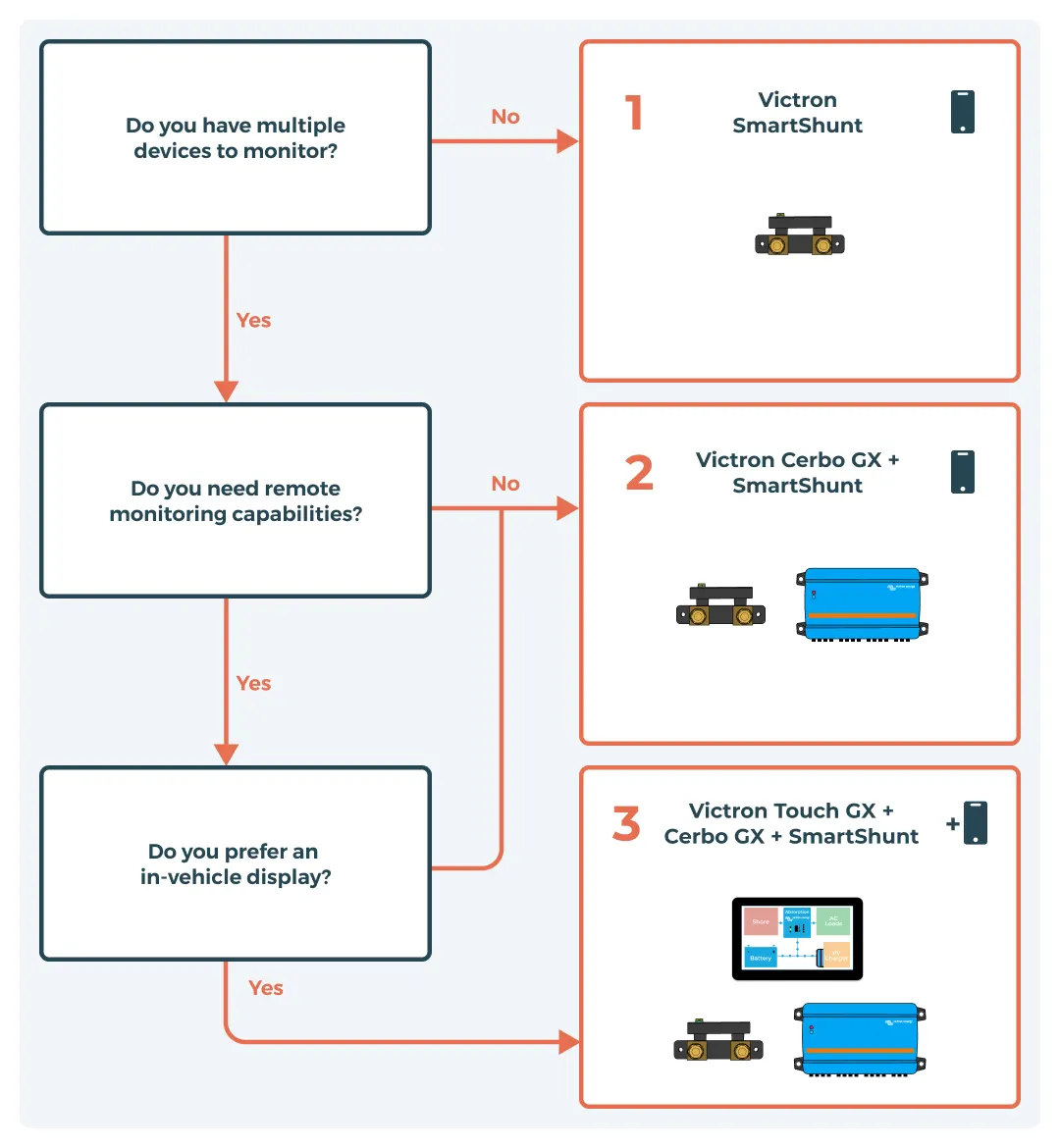
Assessing Your Monitoring Needs
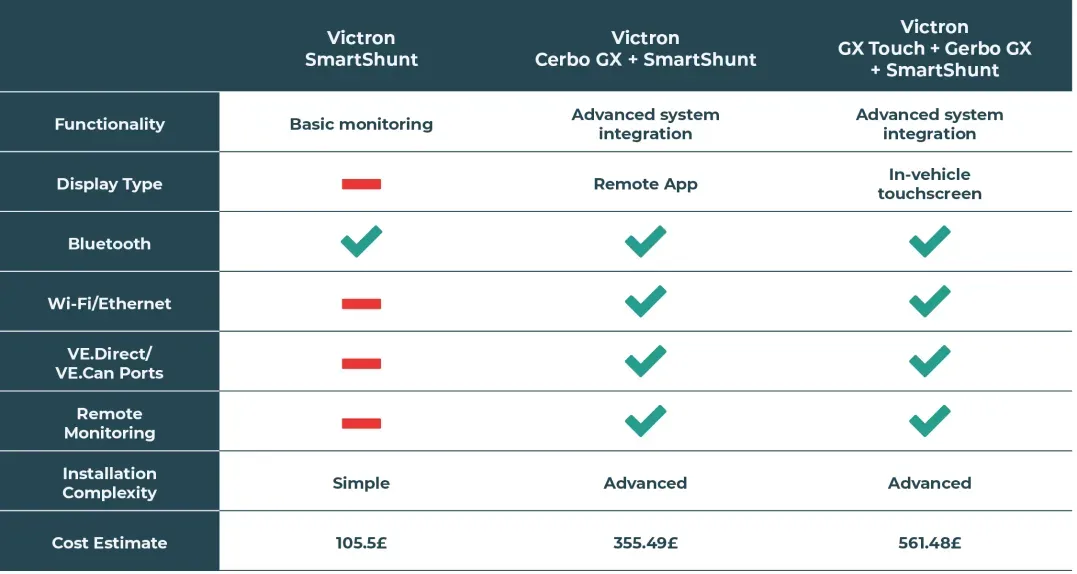
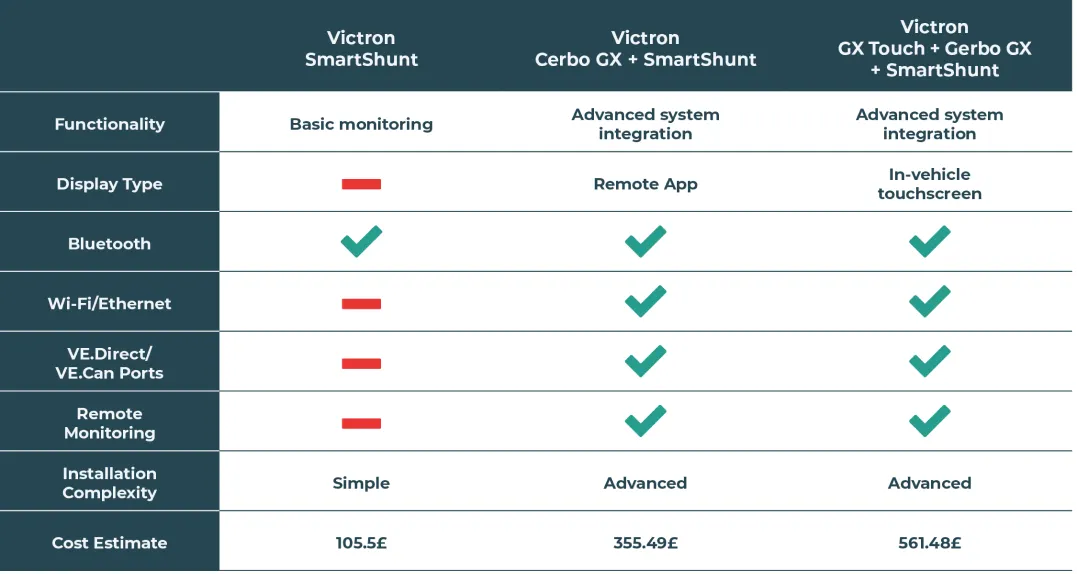
- Basic monitoring: You can use the SmartShunt without the Cerbo GX and GX Touch for straightforward monitoring. As a bluetooth battery monitor with bluetooth built in, it tracks essential data like battery voltage, current, and state of charge. If you only need this basic information and don't need remote or in-vehicle displays, the SmartShunt is sufficient.
- Advanced monitoring: If your setup includes multiple battery systems, solar, or an inverter, the Cerbo GX centralises monitoring, allowing you to access real-time data remotely through the Victron VRM portal. This option suits users who want to follow the battery state of charge of more than one battery source and control multiple power sources.
- In-vehicle display: The GX Touch, paired with the Cerbo GX, is ideal for an at-a-glance display within the vehicle. It offers an intuitive, touch-based view of system data without needing a phone or app, making it a practical choice for quick checks on the road.
Budget Considerations
- The SmartShunt is the most affordable, low cost, and essential of the three devices.
- Adding the Cerbo GX and GX Touch increases costs and may be overkill in many circumstances, though they may justify the price if you need more than the basics and the SmartShunt remains a strong alternative to complete Victron campervan electrical systems.
- If you only need basic monitoring, the SmartShunt will be all you need, but if your budget allows, the Cerbo GX provides a centralised hub, and the GX Touch enhances in-vehicle convenience.
Installation Complexity
- The SmartShunt is straightforward to install.
- Integrating the Cerbo GX and GX Touch adds wiring and setup complexity, especially when you factor in DC to DC charger wiring between your alternator and leisure batteries and any campervan solar panel installation you plan on adding.
- Each additional device requires careful positioning and configuration, so consider installation effort when choosing between setups.
Number of Appliances and Devices
- The more devices and appliances you run, the more power management you'll need, as higher current draw makes monitoring current voltage more important.
- For complex setups with multiple high-draw devices (e.g., fridges, inverters and chargers such as the Victron Multiplus, heating systems), consider the Cerbo GX for centralised monitoring and understanding how much energy heavy loads are using, especially when planning popular electrical upgrades for vanlifers.
Leisure Battery Capacity and Type
- Advanced monitoring can prevent deep discharges and extend battery life in high-capacity battery banks.
- Lithium and AGM batteries have different monitoring needs, and lead acid is less tolerant of deep discharge than lithium, which the SmartShunt and Cerbo GX can support while helping confirm when the battery is fully charged in larger systems.
- Understanding how long leisure batteries last will also shape how much monitoring detail you want.
Solar Panels
- For solar-powered campervan setups, the Cerbo GX offers better integration with solar controllers, letting you track solar input in real-time.
- If you plan to expand your solar array or are comparing different campervan solar panel kits or choose a complete battery and solar panel kit for your campervan, the Cerbo GX enables efficient management and works well alongside dedicated Victron solar kits for campervans.
Inverter and Charger Setup
- If you use an inverter or multiple chargers, the Cerbo GX provides a unified view of all power flows, making tracking energy usage and managing charging easier as part of wider Victron campervan electrical systems.
- Pairing it with a campervan inverter size calculator helps ensure your inverter is correctly matched to your loads.
How to Future-Proof Your Battery Monitoring System
Starting with the SmartShunt provides a scalable foundation. When your energy needs grow, you can add the Cerbo GX for expanded monitoring or the GX Touch for a visual interface. This modular approach lets you build your system over time as your campervan's power demands increase.
Think about long-term energy goals. Will you add more solar, extra batteries, or an inverter? If so, investing in the Cerbo GX and GX Touch can future-proof your setup and, when combined with modular Victron solar kits for campervans and other campervan solar kits with MPPT controllers, make it easier to manage additional power sources or even design custom campervan solar panel kits.
Summary: Why Use a Campervan Battery Monitor?
A campervan battery monitor provides real-time data about a leisure battery's health and capacity, measures the state of charge, helps track state of charge accurately, and provides real-time data on battery voltage and current. Battery monitors help prevent deep discharges that damage batteries. Voltage alone is a poor indicator of battery charge for modern lithium batteries, and without a monitor, estimating battery charge based on voltage is highly inaccurate, especially for lithium batteries.
By using a battery monitor, you can:
- Prevent deep discharges that damage batteries and shorten their lifespan.
- Track ampere-hours consumed and know exactly how much energy remains.
- Avoid relying on voltage alone, which is a poor indicator of battery charge for modern lithium batteries.
- Eliminate guesswork, since estimating battery charge based on voltage is highly inaccurate, especially for lithium batteries.
- Optimise your energy usage, protect your investment in batteries, and enjoy peace of mind on every journey.
Choosing and installing the right campervan battery monitor is one of the best ways to ensure your campervan electrical system is reliable, efficient, and ready for any adventure.